See the week clearly
View five days across, add special days and reorder lessons to match the way your week really works.

TGM Class Timetable
Plan each lesson, keep every teaching resource exactly where you need it, then launch your day directly from the classroom display.
One connected teaching day
Your timetable is more than a list of lesson names. Each lesson can hold the resources you intend to use, in the order you intend to use them.
View five days across, add special days and reorder lessons to match the way your week really works.
Add widgets, PDFs, images, links, videos, notes, QR codes and slide decks to the right lesson.
Open the timetable beside your classroom screen and launch the next resource without hunting through tabs.
Drag a lesson within its day, or move and copy it across to another day without rebuilding it.
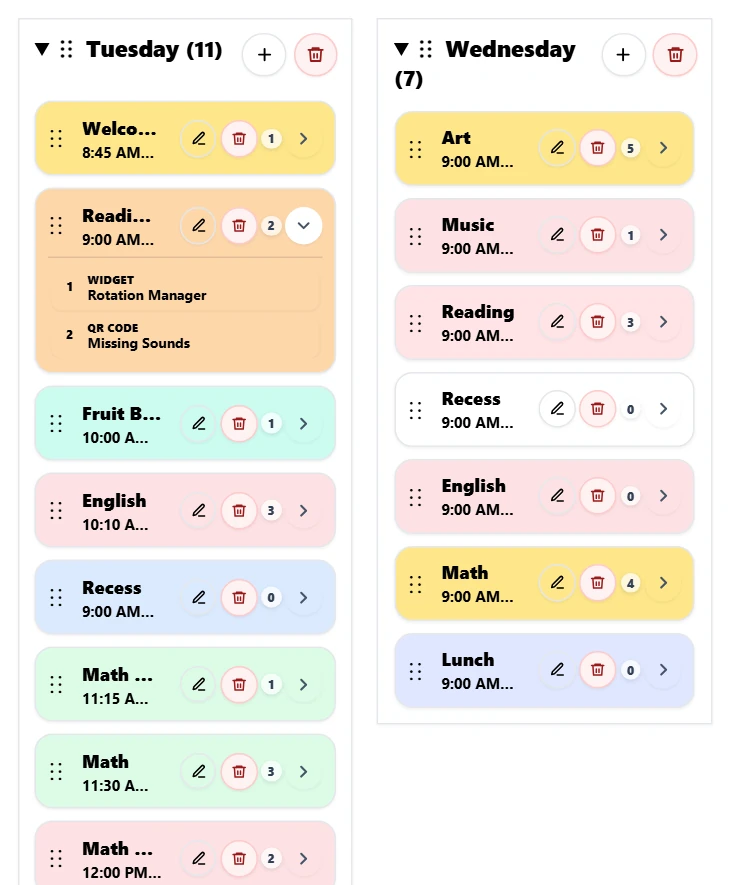
Your week at a glance
Lesson colours match the cards shown on your Classroom Display. The small number shows how many resources are ready, and the chevron opens them without leaving the timetable.
The lesson stays together
Open the chevron to see what is ready before class. During the lesson, launch each item from the timetable and keep the flow moving.
Plans change. Your preparation does not disappear.
Drag the lesson onto another day and choose what should happen. Moving takes the complete lesson with you. Copying keeps the original and creates an independent version on the new day.
You dragged English from Thursday to Friday.
Free
TGM Pro
Build your Class Timetable, attach the resources for each lesson and teach directly from your classroom display.
Build My FREE Class Timetable →